
How to Prepare a Terminal Component RFQ Package
A practical OEM checklist for preparing drawings, samples, materials, finish zones, interfaces, quantities, and approval rules before quoting terminal components.
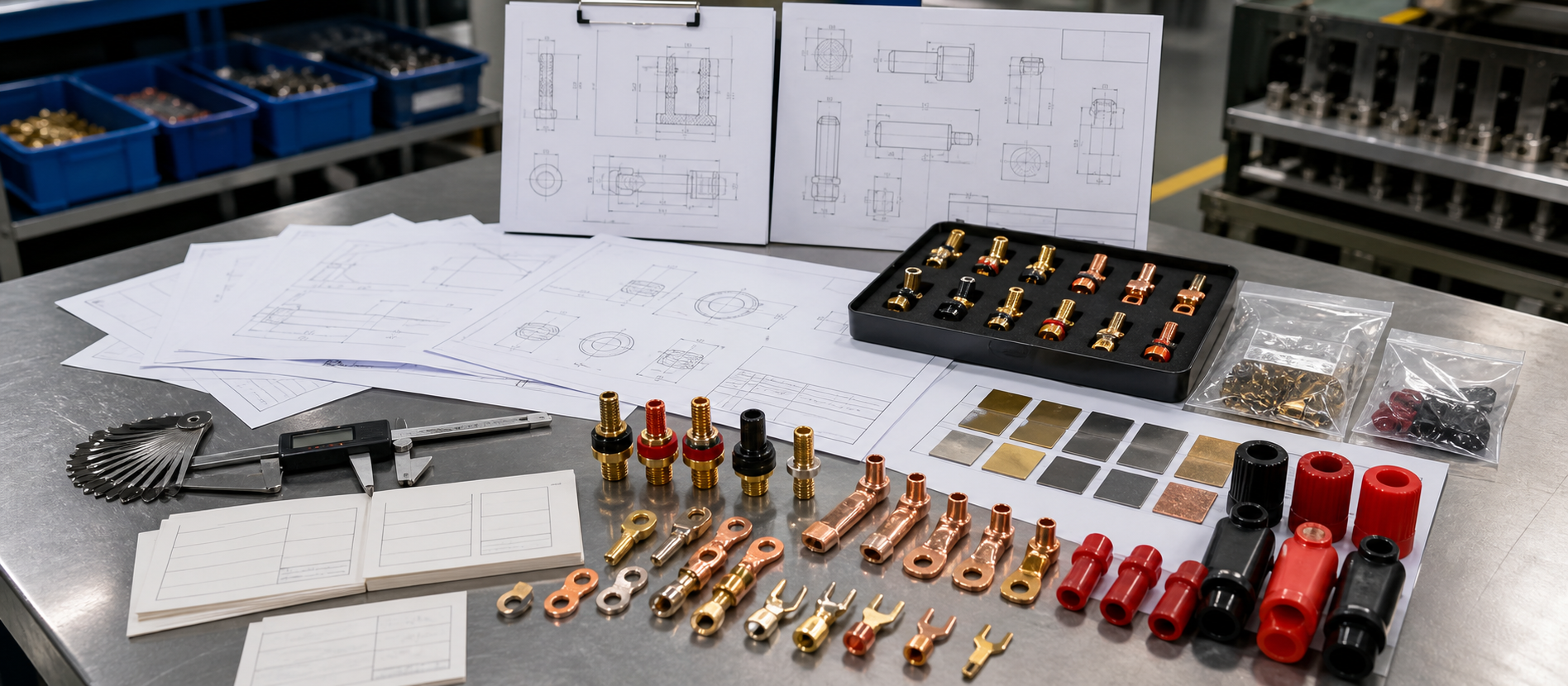
The fastest way to make a terminal component RFQ useful is to send an engineering review package, not only a product photo and a target price. A supplier needs enough information to understand the part, the mating interface, the finish, the quantity stage, and the approval basis before a quotation can mean anything.
Our supplier view is direct: an RFQ that cannot define what must be held, what may change, and how the sample will be approved is not ready for a reliable quote. More pages in a drawing pack do not automatically make an RFQ better. The useful package connects the part to its job in the equipment.
This guide explains what OEM buyers should prepare when sourcing binding posts, brass or copper terminal parts, spade connectors, panel terminals, and custom terminal components.
Is Your RFQ Ready for a Reliable Quote?
When we review a terminal-component RFQ, we would start with five questions:
- What is the part supposed to connect? Identify the plug, lug, wire, busbar, socket, panel, enclosure, or insulation interface.
- Which dimensions and surfaces are functional? Separate contact zones, threaded zones, panel-fit surfaces, insulation seats, and appearance zones.
- What is already decided? State the approved material, finish, sample, drawing revision, and mating hardware when they are known.
- What is still open? Mark unknown material, finish, packaging, quantity, inspection, or compliance requirements as open decisions.
- What releases the project? Define the sample, inspection notes, photos, drawing revision, packaging reference, and approval owner that control repeat production.
Do not ask a supplier to guess the critical requirements from a photograph. A photo is useful evidence, but it rarely defines thread fit, hidden surfaces, material, finish coverage, assembly order, or the buyer’s acceptance rule.
Build the Terminal Component RFQ Package
The package does not need to be complicated. It needs to be complete enough for the supplier to identify the part and the decisions that affect manufacturing.
| RFQ Input | What to Include | Why It Matters |
|---|---|---|
| Drawing or marked photo | Dimensions, datums, threads, holes, critical faces, and revision | Gives the supplier a controlled geometry reference |
| Sample or reference part | Physical sample, approved photo, or existing part number | Helps resolve details missing from the drawing |
| Application context | Equipment, panel, cable, plug, lug, socket, or mating hardware | Connects the component to its working interface |
| Material basis | Required material, known grade, or open material decision | Prevents a finish or machining discussion without a base-material basis |
| Finish requirement | Finish name, visible zones, contact zones, masked areas, and reference sample | Separates appearance from functional surface control |
| Quantity stage | Prototype, sample, pilot, repeat production, or forecast range | Gives the supplier the project stage rather than a misleading single number |
| Inspection and approval | Critical checks, sample approval method, photos, and responsible reviewer | Establishes what “accepted” means before production |
| Packaging and assembly | Loose or pre-assembled parts, protection, labels, bags, trays, or sets | Protects the part and preserves the approved configuration |
When one of these inputs is not available, label it as TBD or “supplier review required.” That is more useful than filling the gap with an unverified assumption.
Define Functional Surfaces on the Drawing
A terminal drawing should make the important surfaces easy to find. The critical information is not always the longest dimension list; it is the relationship between the component and the equipment.
Mark these areas when they apply:
- Contact surface: the face, bore, edge, plug interface, lug interface, or threaded contact that performs the connection.
- Panel-fit surface: the shoulder, mounting thread, nut seat, washer stack, hole, or enclosure interface that controls installation.
- Insulation interface: the surface that mates with a molded cap, bushing, washer, sleeve, or panel insulation.
- Protected or masked area: a thread, bore, datum-like face, or mating area that should not be treated like a broad appearance surface.
- Appearance area: the visible surface that must match the approved sample after assembly.
- Inspection point: the feature that the buyer expects to see checked or documented before release.
For a drawing-based brass part, review the geometry with custom brass components and brass machining. For a copper contact part, connect the drawing to custom copper components and copper machining.
Prove Fit with Samples and Mating Hardware
Send the sample or reference part when it carries information the drawing does not. A supplier should know whether the sample is a dimensional reference, a finish reference, an assembly reference, or only an example of the general form.
Mating hardware is just as important. Include the nut, washer, plug, lug, cable, socket, panel, enclosure, or insulation part when it affects fit or acceptance. A terminal can look correct as a loose part and still fail the assembled review because the thread travel, shoulder, washer stack, or insulation fit was never checked.
If the project is a new or modified interface, route the package through OEM terminal development so material, finish, assembly, sample approval, and release decisions stay connected.
State Material, Finish, and Performance Requirements
Material and finish requirements should be written as project decisions, not implied by a color or a catalog photograph.
For the material section, state:
- the required material or the alternatives under review;
- whether the material affects contact, machining, weight, appearance, or assembly;
- whether the material is fixed by an existing drawing or still needs engineering review.
For the finish section, state:
- the requested finish or approved reference;
- contact zones, appearance zones, threaded zones, and protected areas;
- whether finish approval is visual, dimensional, functional, or a combination;
- how the sample will be compared before repeat production.
For electrical or performance-sensitive requirements, send the buyer’s exact requirement and test basis for separate review. This article does not assign a current rating, voltage rating, temperature limit, plating thickness, certification, tolerance, or test result to Axiterm products.
The plating and finish review page is the right capability owner when the RFQ depends on coverage, masking, contact zones, or appearance approval.
Define Quantity by Project Stage
“Please quote” is not a complete quantity instruction. Tell the supplier which stage the number belongs to:
| Stage | Useful Input |
|---|---|
| Prototype | Prototype quantity, drawing status, and whether the part is for fit learning |
| Sample approval | Sample quantity, sample comparison method, and approval owner |
| Pilot build | Pilot quantity, assembly context, and expected revision activity |
| Repeat production | Expected order range, variant split, packaging set, and release revision |
| Forecast discussion | Planning range, not a guaranteed order or delivery commitment |
The supplier may need to review different manufacturing or packaging assumptions at each stage. A prototype request and a repeat-production request can use the same part number while requiring different review questions.
Close the RFQ Gaps Before Quotation
| Gap | What It Causes | Better Input |
|---|---|---|
| Photo without drawing or dimensions | Quote based on an incorrect geometry assumption | Drawing, sample, or marked dimensions |
| Finish named by color only | Contact, thread, or masking disagreement | Finish zones and approved reference |
| No mating hardware | Fit failure after the loose part looks correct | Plug, lug, nut, washer, panel, or insulation reference |
| One quantity with no project stage | Pricing and process assumptions that do not match the program | Prototype, sample, pilot, repeat, or forecast stage |
| No revision owner | Approved sample and later shipment drift apart | Drawing, BOM, photos, and approval owner |
| Generic “quality” request | Different interpretations of acceptance | Critical checks and sample release criteria |
| Packaging added at the end | Scratches, mixed variants, or incomplete sets | Packing method and completeness check in the RFQ |
These are definition gaps, not merely communication preferences. They are often cheaper to resolve before quotation than after a sample or shipment exposes them.
Submit a Quote-Ready RFQ Package
Before sending the package through the RFQ page, confirm that it contains:
- A drawing, sample, or marked photo with a clear revision or reference date.
- The component’s job in the equipment and the mating interface.
- Material and finish requirements, with open decisions labeled clearly.
- Contact, panel-fit, insulation, threaded, protected, and appearance zones when relevant.
- Quantity by project stage, including sample and repeat-order expectations.
- Assembly status: pre-assembled, loose parts, or buyer-side installation.
- Inspection points, sample approval method, and approval owner.
- Packaging, labeling, variant, and completeness requirements.
- Any performance, compliance, testing, MOQ, or lead-time requirement for separate confirmation.
If the package passes this checklist, the supplier can spend the review time on manufacturability, fit, finish, sample planning, and production release instead of reconstructing the basic request.
Route the RFQ to the Right Axiterm Owner
This article is an RFQ-support page. It does not replace the owner pages:
- Use binding posts for the binding-post product family and its OEM application path.
- Use custom terminal components for drawing-based terminal parts.
- Use terminal component assembly when the project includes complete sets, pre-assembly, packaging, or revision control.
- Use plating and finish review when surface treatment or zone control is central.
- Use industrial equipment when the terminal is part of a machine, panel, enclosure, or repeated industrial assembly.
The purpose of this guide is to improve the quality of the handoff into those routes. It should earn the RFQ by reducing uncertainty, not by pretending that an incomplete specification is already a quote-ready production order.
Frequently Asked Questions
Can I send only a photo for a terminal component RFQ?
A photo is a useful starting point, but it is rarely enough for a reliable engineering review. Add dimensions, a sample, mating hardware, material or finish assumptions, quantity stage, and the acceptance basis where possible.
What is the most important RFQ document?
Usually it is the controlled drawing or sample reference, paired with the application and mating-interface information. The most important document is the one that makes the functional surfaces and approval basis unambiguous.
Should I specify the material and finish before contacting a supplier?
Specify what is already fixed and label what is still open. A supplier can review alternatives, but an unmarked assumption can become a costly change after sampling.
Do I need to send the mating nut, plug, lug, or panel?
Send it when fit, thread travel, contact, washer stack, insulation, or assembly acceptance depends on it. Loose-part inspection cannot replace an assembly-context review.
Can Axiterm quote a project with incomplete information?
A preliminary review may be possible, but the quotation strength depends on the missing inputs. Drawing, sample, interface, material, finish, quantity stage, and approval requirements should be clarified before treating a quote as production-ready.
Source and Review Boundary
This article uses Axiterm’s RFQ, OEM Terminal Development, Custom Terminal Components, Binding Posts, Brass Machining, Copper Machining, Plating, Assembly, and Industrial Equipment pages as the source for the review path. It is a support article for the RFQ and capability owners, not a replacement for product specifications.
Method and limitation note: final material, finish, dimensions, inspection method, electrical performance, certification, MOQ, lead time, packaging, and release approval depend on the buyer’s drawings, samples, mating interfaces, equipment context, and project evidence. No Axiterm rating, certification, exact tolerance, test result, MOQ, lead time, or customer case is claimed here. Reviewed by Gben, Marketing Manager.